
Reading the checks badge
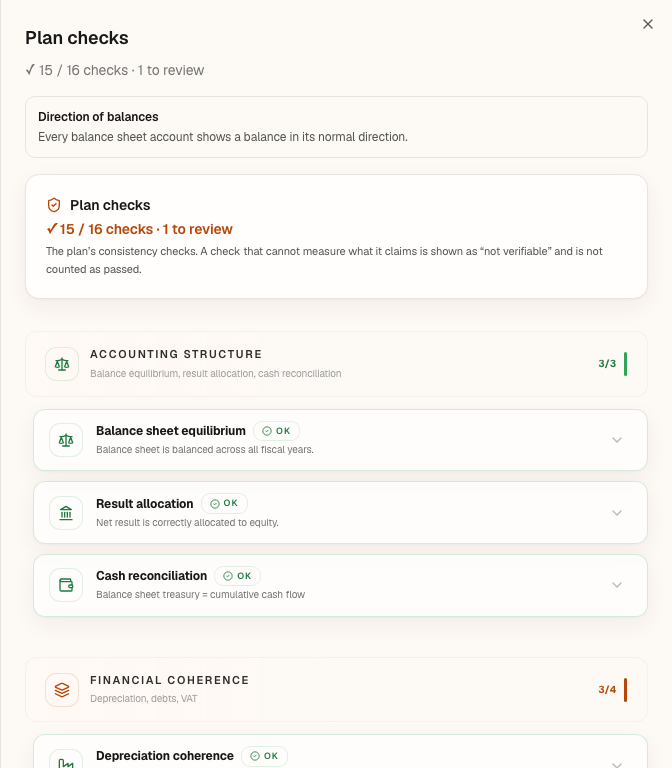
At the top of each file, a checks badge summarises the plan's consistency checks. It blocks nothing: it flags. Its colour tells you whether anything is left to review; its text tells you what.
What it is for
Fiplan runs the plan through 17 checks: balance sheet equilibrium, cash, depreciation, debts, VAT, margins, the reduced rate of corporate income tax, and input compliance — date of incorporation, straight-line depreciation, subsidies, leases, the incorporation rules of the Companies and Associations Code (CSA / WVV). The checks badge counts the 16 checks that can fail, so that no inconsistency goes into a report without having been seen.
Steps
- Open the file: the badge is in its header, next to the name.
- Read its text:
✓ passed / total checks, then, if there are any, the checks to review, blocking and not verifiable. A count of zero is not shown; a check that is not applicable is not counted. - Click the badge: the Plan checks panel opens, in four categories — Accounting Structure, Financial Coherence, Business Checks and Input compliance —, with each check and its state: OK, Warning, Error, Not verifiable or Not applicable.
- On a check to review, click its button: Fix opens the screen where the cause lies; Complete in Taxation, on the reduced rate, opens the Taxation tab. A check without a button writes the action in its text: the date of incorporation, for instance, is entered on the client's record.
The 17 checks: Balance sheet equilibrium · Result allocation · Cash reconciliation · Depreciation coherence · LT/ST debt vs schedules · VAT consistency · EBITDA coherence · Margin coherence · Minimum cash position · SME reduced-rate eligibility · Impossible values · Monthly ↔ annual reconciliation · Company incorporation date · Straight-line depreciation of assets · Capital subsidies · Property leases: land value · Incorporation compliant with the CCA.
Worked example · Boulangerie Dupont SRL
Three states of the same file, as Fiplan writes them (text and colour produced by the badge function):
| Situation | What the badge shows | Colour |
|---|---|---|
| All checks pass | ✓ 16 / 16 checks | green |
| One check to review (here “Minimum cash position”) | ✓ 15 / 16 checks · 1 to review | orange |
| The same check in error, hence blocking | ✓ 15 / 16 checks · 1 blocking | red |
The bakery's file, as it is entered, shows “✓ 15 / 16 checks · 1 to review”, in orange: the check to review is “SME reduced-rate eligibility”, because conditions (a) and (c) of the reduced rate are not answered yet. Its Complete in Taxation button opens the tab where you answer them.
Pitfalls
What it changes
Source
The Fiplan engine: the consistency checks (financial-controls.ts, four categories) and their summary (controles-synthese.ts) — passed, to review, blocking, not verifiable, not applicable; a check that cannot know says so, it never passes. Vaga's decision V-10 (MOTEUR-3): “EBITDA coherence” not applicable, outside the count and the colour. The “Input compliance” category takes over what the Results screen used to flag above the income statement (RESULTATS batch, R4).