
Search and shortcuts
One key to go anywhere: the search finds a file by its name or by its client, opens a firm page, or starts a creation.
What it is for
The search opens with Ctrl K (⌘ K on Mac) or with the Search a file, a client, an action… bar at the top of the screen. Its results come in four groups, always in this order: Actions (the four creation actions), Dossiers (with the client's name), Clients, Pages.
Each word you type must appear in the name, in the client or in the keywords; accents and capitals do not count, and an action or a page can also be found by its name in the other two languages of the application (French or Dutch).
Steps
- Press Ctrl K (or ⌘ K).
- Type a few letters.
- Choose with ↑ and ↓, open with Enter; Esc closes.
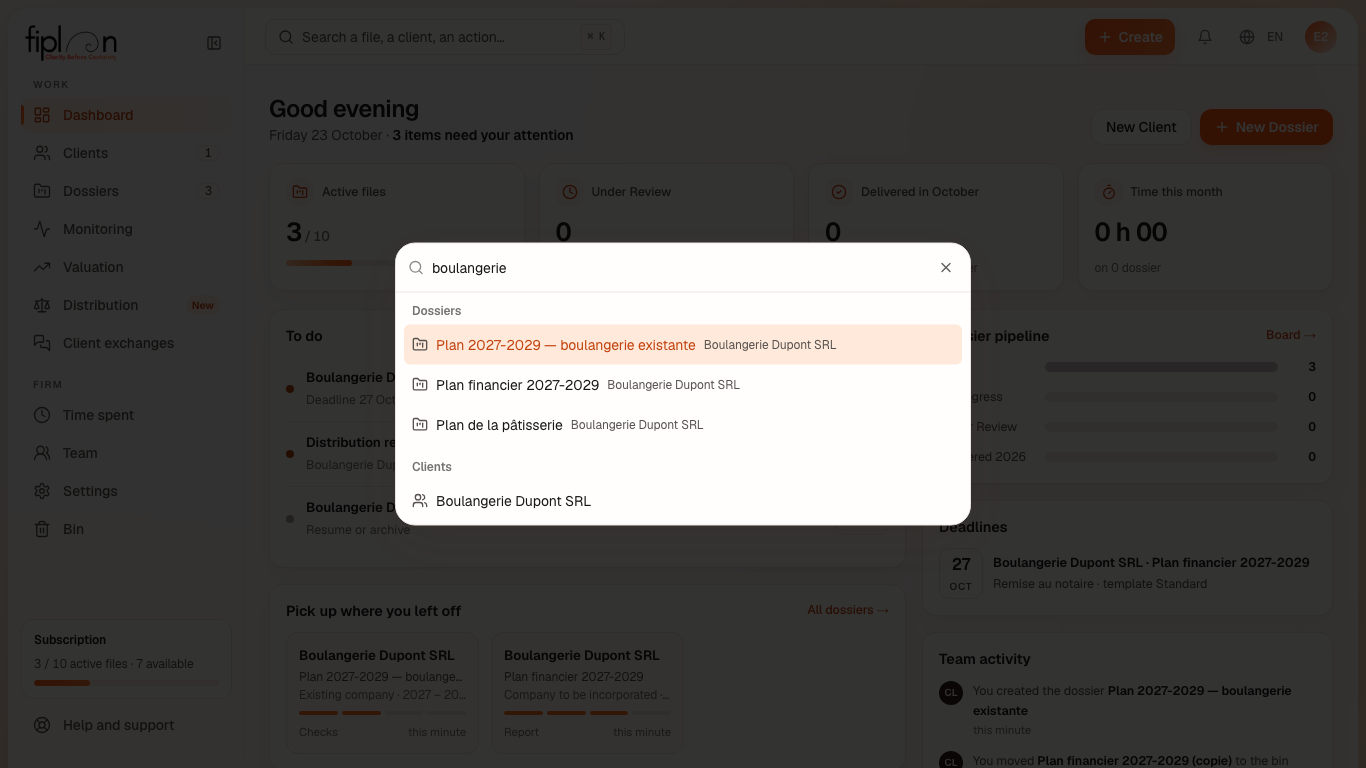
Worked example · Boulangerie Dupont SRL
| You type | You find |
|---|---|
| boulangerie | Plan financier 2027-2029 · Plan de la pâtisserie · Boulangerie Dupont SRL |
| patisserie | Plan de la pâtisserie |
| societe | Existing company |
| prullenbak | Bin |
“boulangerie” finds 3 items: the second file does not have this word in its name, but its client does. “societe” finds the action even without the accent, and the Dutch word “prullenbak” finds the bin.
Pitfalls
What it changes
Source
Fiplan convention (RechercheGlobale, recherche-globale.ts): the four groups, insensitivity to accents and case, the keywords in three languages.