
A tour of the application
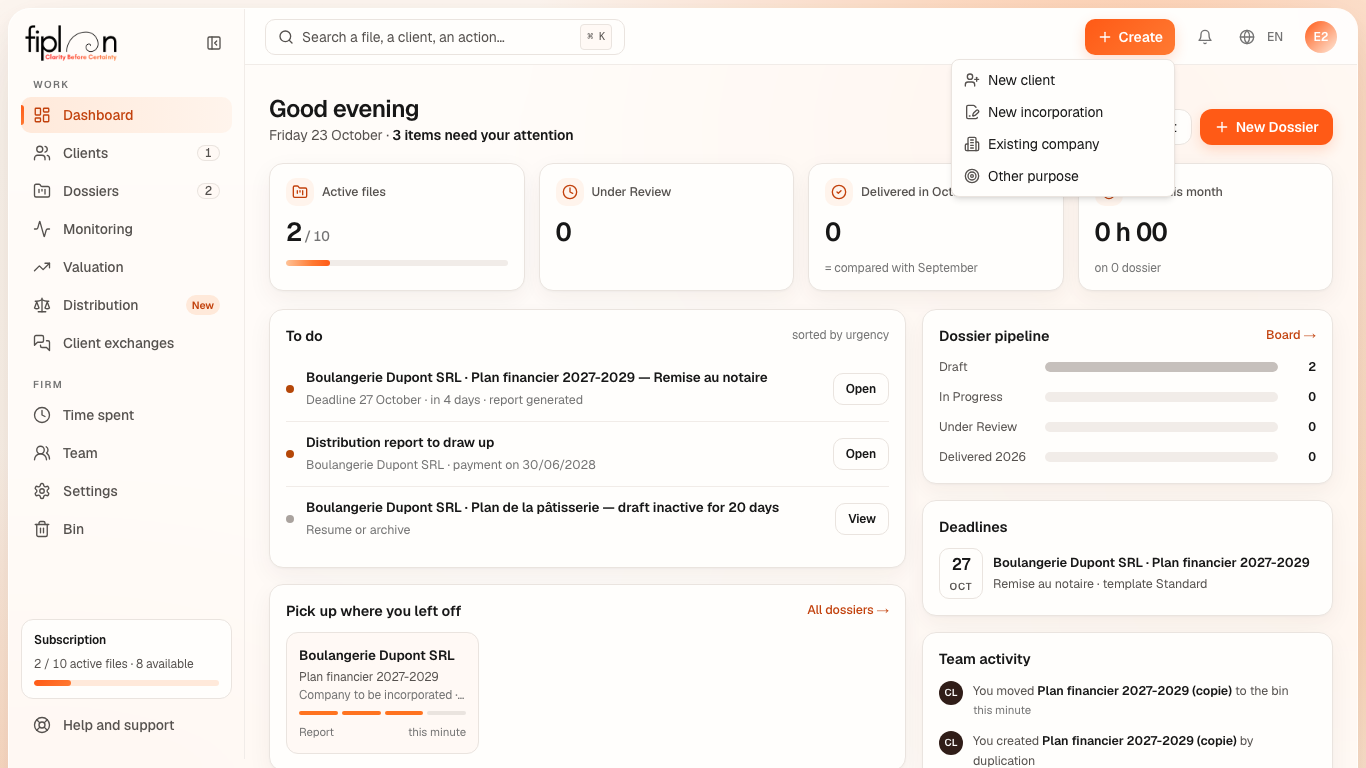
Fiplan has two levels: the firm, where your clients and files live, and the file, where a plan is built. The sidebar changes its content when you enter a file.
What it is for
At firm level, the sidebar has two groups:
| Group | Entries |
|---|---|
| Work | Dashboard, Clients, Dossiers — with the number of clients and files —, Monitoring (the files under monitoring and the import of several trial balances), Valuation (the firm's valuations and, in a second tab, Capital gains 2026), Distribution (the distribution tests, with the New tag) and Client exchanges (with the number of exchanges to handle) |
| Firm | Time spent, Team, Settings, Bin |
At the bottom, the Subscription box shows the active files against the firm's limit, and Help and support opens the help.
The top bar holds the search (Ctrl K, or ⌘ K on Mac), the Create button — new client, new incorporation, existing company, other purpose —, the Notifications and your profile menu.
The Notifications bell gathers Fiplan's announcements (tips, what's new, maintenance) and the firm's events — a client's answer, an approved plan, a viewed monitoring report, a late trial balance, an advance payment within 7 days —, each with its link; a red number shows what is unread, and Mark all as read clears it. At your first sign-in it welcomes you: Start the tour shows in five steps the bell, your work thread, Create, search and your profile (arrow keys, Esc to leave).
Inside a file, the sidebar shows its 8 modules: Encoding, Taxation, Results, Analysis, Report, then Monitoring — the actual trial balances, imported and checked, without ever touching the plan —, Valuation — the value of the shares — and Distribution — the tests before a distribution. These last three modules run in five steps, on a bar: ① Data · ② Checks · ③ Assumptions · ④ Result · ⑤ Report. The Firm link takes you back to the list of files.
Steps
- After signing in, you land on the Dashboard.
- Open Clients for a company's record, Dossiers for the list of plans.
- Open a file: the sidebar switches to the file's modules.
- Click Firm at the top of the sidebar to go back.
The first time you open a file, a map circles and numbers its five areas — the modules, the form, overview and help, the checks, the report —; Let’s go closes it. The tour and the map can be replayed in Help and support: Replay the tour, Replay the map.
Worked example · Boulangerie Dupont SRL
The bakery's file “Plan financier 2027-2029” is worked through in module order: entering its 10 lines, the tax in Taxation, the statements in Results, the ratios in Analysis, the PDF and the Excel file in Report. Once the company is trading, its trial balances arrive in Monitoring; before paying out a dividend, the test is done in Distribution.
Pitfalls
What it changes
Source
Fiplan convention (AppSidebar, Header, NavigationDossier, modules-dossier.ts, BarreParcours): the sidebar entries, the top bar, the modules of a file, the five steps of monitoring, valuation and distribution.