
Valuing the business
What are the shares worth? The Valuation module starts from the plan's figures, normalises them, calculates six methods, weights them by context (sale, entry of a shareholder, family transfer) and shows every formula, so that it can be redone by hand. The valuation report goes to the client with the value.
What it is for
The file's Valuation module follows the bar shared by the modules. The module's own screens are in French for now: their labels are quoted here in French.
- ① Data — Pourquoi valoriser, et à quelle date ? (why value, and at what date?) The context, on three cards, each with the weight it gives each method; D'où viennent les chiffres (where the figures come from): the plan, the monitoring year-end forecast and the accounts of the closed financial year, each “Repris” (taken over) or not; the valuation itself: the date, the number of shares, net debt, adjusted net assets, and the cash flows taken from the plan, as bars.
- ② Checks — L'EBITDA représente-t-il une année normale ? (is EBITDA a normal year?) From reference accounting EBITDA to normative EBITDA, adjustment by adjustment, each “Accepté” (accepted), À trancher (to decide) or “Refusé” (refused), as a waterfall; then the Cohérence des données (data consistency).
- ③ Assumptions — Taux et sensibilité (the cost of equity and the WACC, their formula, one value per rate and D'où vient ce chiffre ? — where the figure comes from —, the WACC × perpetual growth grid, what moves the value) and Méthodes (the formula of each of the six methods, then the same formula with its figures).
- ④ Result — “Synthèse” (the equity value, its range and its value per share, Ce qui ferait monter la valeur, the methods on a single scale, the DCF formula and its figures, the consistency checks) and “Plus-values 2026”.
- ⑤ Report — the valuation report: its contents to tick, the PDF preview, the PDF and the Excel file, and sharing with the client. The value appears in the client's space, Value tab, with the valuation report: they download it there (Download the valuation report (PDF)) and find it again in the file's Documents tab.
Fiplan sets no market data by default: a method missing an assumption is “à compléter” (to be completed), with what is missing and where to enter it.
The firm's Valuation page has two tabs. Valuations lists each file valued: the client and the purpose, the valuation date, the equity value (or to compute), the journey in five points, the status — Report published, “… to review” or In progress — and Open. Capital gains 2026 runs the capital gains test for all client companies.
Steps
- Open the file, Valuation module — or, from the firm's Valuation page, New valuation, the File to value, then Open the valuation.
- ① Choose the context: a card, then the source and date of that choice. Its weights are changed with Modifier les poids (totalling 100%). Choose the valuation date — the end of one of the file's financial years: the discounted cash flows are those of the following years — and the number of shares: that of the shareholders on the client record, or, in one click, that of the file's founders. If the file is under monitoring, the monitoring year-end forecast replaces the plan's figures only if you choose it.
- ② Decide on each adjustment Fiplan proposes from the journal: “Accepter” (accept: the amount and the justification are entered, never guessed) or “Refuser” (refuse, with its reason). Ajouter un retraitement adds another one. The step stays To review while a proposal is undecided.
- ③ In Taux et sensibilité, complete each rate: Reprendre l'OLO du jour, Reprendre la référence (market risk premium, multiples) or Choisir le secteur (the beta), then Utiliser cette référence — one click saves the value, its source and its date. A size or specific premium is entered with its justification. Review the formulas in Méthodes.
- ④ Read in “Synthèse” (summary) the equity value, its range and its value per share; in “Plus-values 2026”, the starting value of the shares at 31 December 2025.
- ⑤ Tick the “Contenu du rapport” (Limites de l'évaluation is always included), review the preview, then “Télécharger le PDF” (download the PDF) or Excel avec formules. Partager au client publishes the value and this PDF; afterwards, Publier une nouvelle version replaces it, and “Retirer la publication” (withdraw the publication) withdraws it from the client's space.
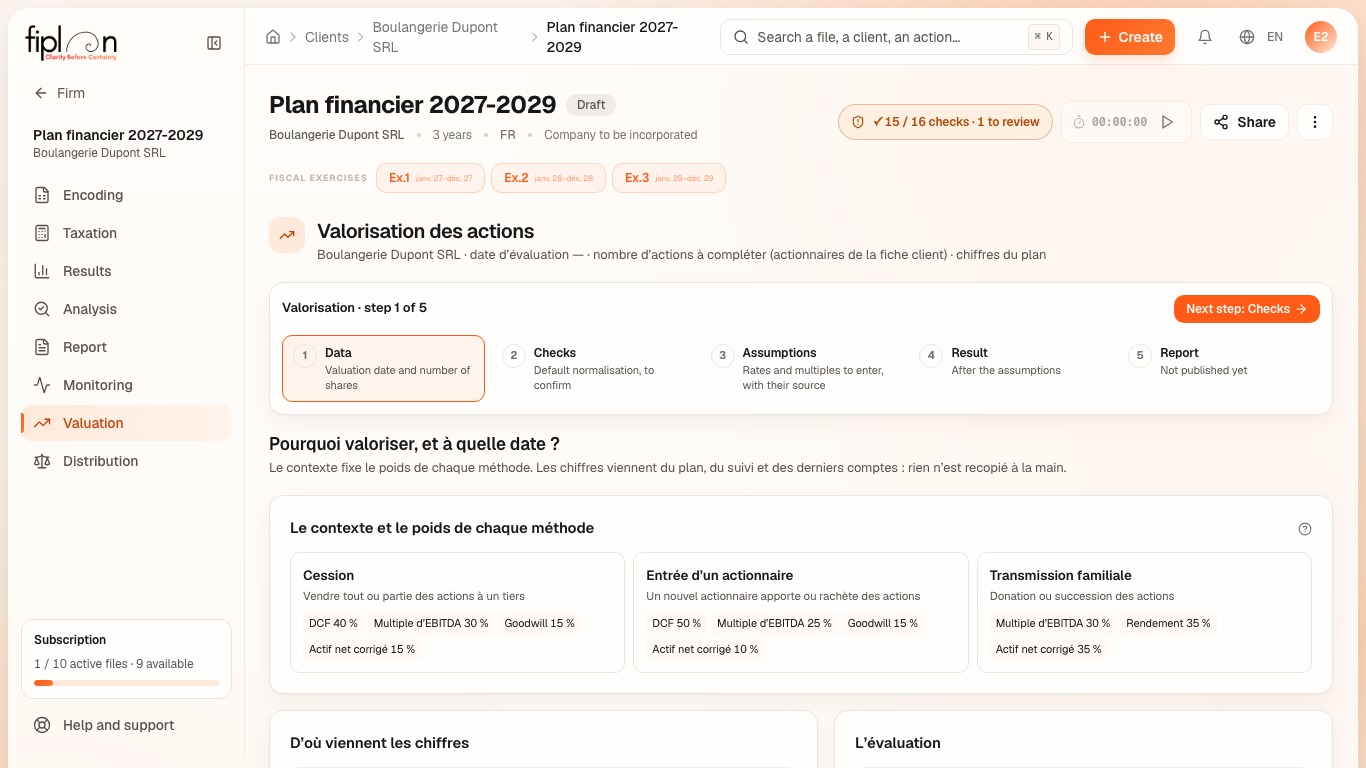
Worked example · Boulangerie Dupont SRL
The bakery is valued at the end of its first financial year, on 31 December 2027, with no assumption entered.
- ① Net debt deducts from financial debts (€33,322.82) the cash at bank and in hand (codes 54/58, €133,416.58) and the other short-term investments (51/53): -€100,093.76. With no latent capital gain entered, adjusted net assets equal the equity of the statutory balance sheet, €103,076.13.
- ② As long as no adjustment is accepted, normative EBITDA equals reference accounting EBITDA — the average EBITDA of the plan's financial years —: €109,066.85.
- ③ and ④ Without rates or multiples, 5 methods are “à compléter” (to be completed); only adjusted net assets are calculated.
| “Sale” context: proposed weights | In % |
|---|---|
| Discounted cash flows (DCF) | 40 |
| EBITDA multiple | 30 |
| Goodwill (shortened annuity) | 15 |
| Adjusted net assets | 15 |
Pitfalls
What it changes · 2027
Source
Methods and dated sources: docs/references/valorisation/SOURCES.md (DGFiP 2026 and CNAM for the methods, A. Damodaran, Argos, Vlerick and the Belgian Debt Agency for the references); net debt: headings VIII and IX of the statutory balance sheet (Royal Decree implementing the CSA, annexes 3 and 4; codes 51/53 and 54/58 of the NBB forms). Weights by context: Fiplan workshop convention (V-21). Normative tax: ordinary corporate income tax rate, art. 215, para. 1, ITC 92. 2026 capital gains: art. 102, para. 4, ITC 92 (Law of 6 April 2026); EBITDA of c): art. 275⁹, para. 2, sub-para. 3, ITC 92 (Law of 27 June 2021, art. 83, c)).
Fiplan convention (PartagerClient.tsx, publier_valorisation): the client sees in their space, “Value” tab, a snapshot of results — the range, the central value, the methods in words, the levers —, never the assumptions; the valuation report published is the preview's PDF, with the ticked contents, and is downloaded from the “Value” and “Documents” tabs.