
Correcting the prior year (N-1) of an existing company
The final annual accounts (comptes annuels / jaarrekening) often arrive after the plan has started. Fiplan lets you correct the N-1 without recreating the file: the plan follows.
What it is for
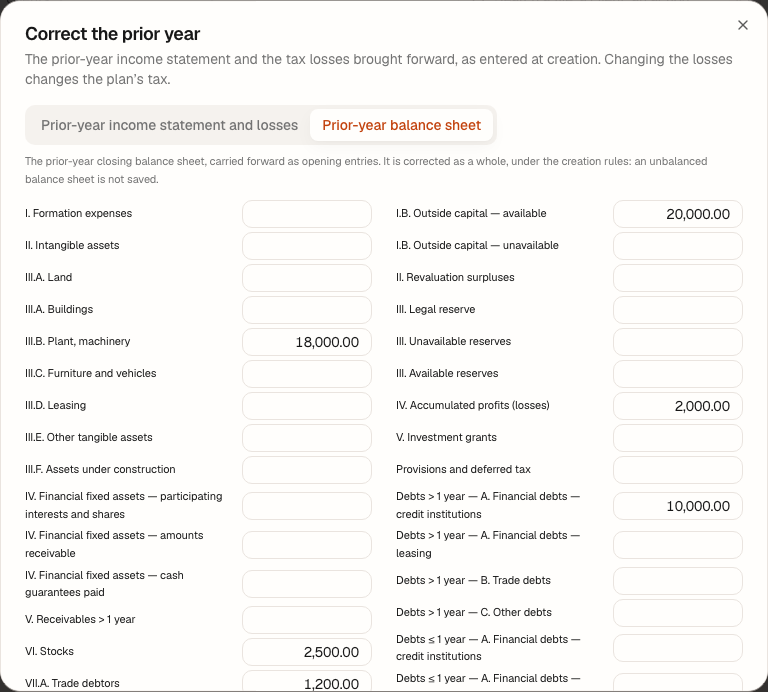
The menu of an existing company's file offers Correct the prior year (income statement, tax losses). The window has two tabs: Prior-year income statement and losses — the same step as at creation, with the prior tax losses — and Prior-year balance sheet, which is re-entered in full, under the creation rules.
Steps
- Open the file, then its menu, and choose Correct the prior year (income statement, tax losses).
- Prior-year income statement and losses tab: correct the headings, the result (9904) and the losses.
- Prior-year balance sheet tab: correct the amounts; an unbalanced balance sheet is not saved.
- Click Save the prior-year balance sheet or save the income statement tab.
Worked example · Boulangerie Dupont SRL
The existing bakery receives its final accounts: the bank stood at €14,800.00 instead of €14,300.00, and the profit carried forward at €2,500.00 instead of €2,000.00. The corrected N-1 balance sheet still balances — €36,500.00 on each side, difference €0.00 — and Fiplan replaces all its opening entries (à-nouveaux / openingsboekingen) in one go.
Pitfalls
What it changes
Source
Fiplan convention (CorrectionN1Dialog, CorrectionBilanN1): the same rules as at creation, the replacement of the N-1 balance sheet in a single transaction.