
Archiving, moving to the bin, restoring
Fiplan deletes nothing in a single click. A file first goes through the bin, a plan handed to a bank is archived, and the trace of each action stays in the firm's activity.
What it is for
Three actions, depending on what you want to make disappear:
| What you do | What happens | Who can undo it |
|---|---|---|
| Delete a file | it goes to the Bin for 30 days | the owner or an administrator of the firm |
| Delete a delivered plan | it does not go to the bin: it is archived | by moving the file back to in progress |
| Archive a client | it leaves the list; its files stay intact and readable | Restore, on its record |
A client with no file — neither active nor in the bin — is deleted; as soon as it has one, it is archived.
Steps
- In the file's menu, choose Delete: the “Move the dossier to the bin” window opens.
- Confirm with Move to the bin.
- To get it back, open the Bin (under “Firm”) and click Restore.
- To delete it for good, click Delete permanently and type the file's name to confirm.
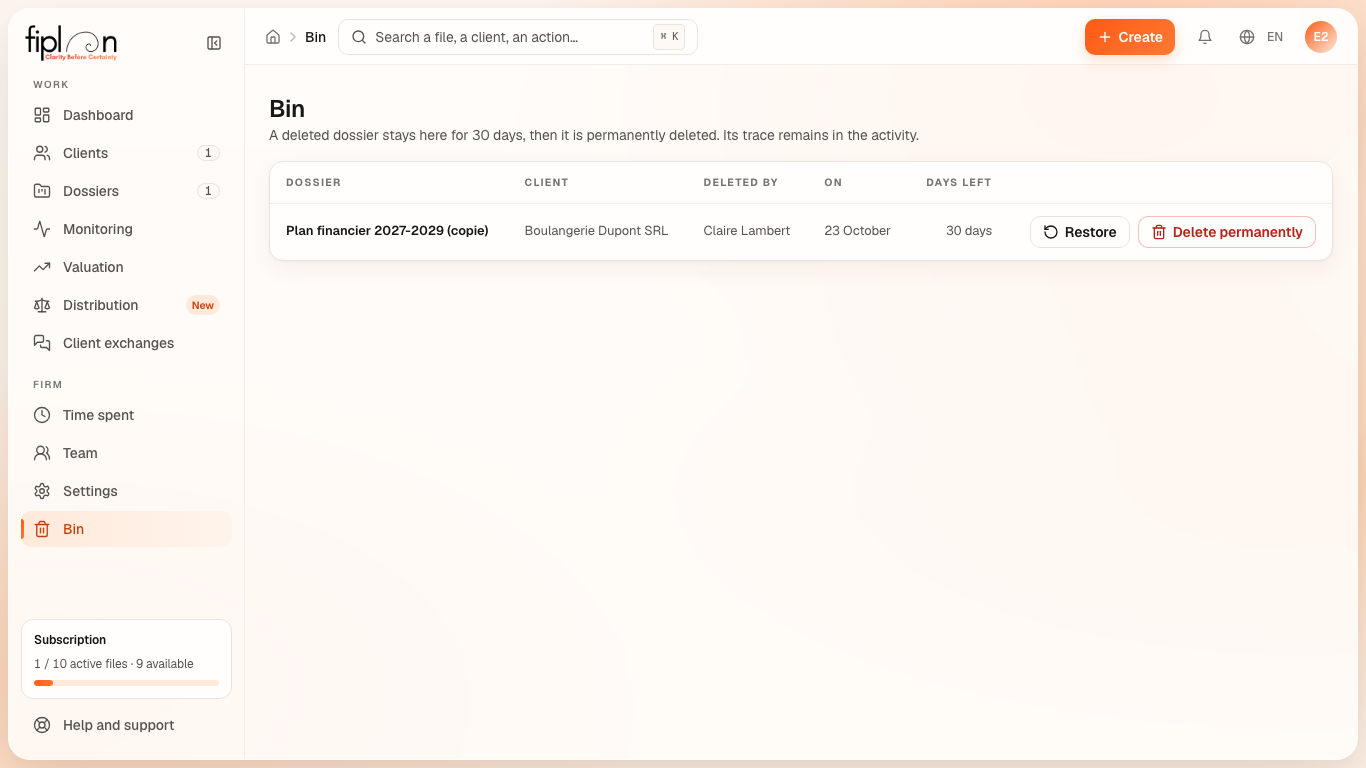
Worked example · Boulangerie Dupont SRL
The firm duplicated the bakery's plan to test an assumption, then moves the copy to the bin. The bin shows “30 days” left; the countdown turns orange at three days. On the thirtieth day, Fiplan deletes the copy permanently — the firm's activity keeps the line “deleted after 30 days in the bin”, and the time spent on the copy still counts.
The original plan, for its part, was delivered to the notary: it never goes to the bin. Delete offers Archive the dossier.
Pitfalls
What it changes
Source
Fiplan convention (Corbeille, DialogueSuppressionDossier, actionFinDeVie, functions restaurer_dossier and purger_corbeille): 30 days in the bin, the archiving of a delivered plan, restoring reserved for the owner and the administrator, the quota checked on restoring.