
Exchanges with your clients
You ask your client a question where it arises — a line of the entries, a monitoring variance — and they ask you questions from their space. Each exchange keeps its company, its file and its subject; an answer never changes the plan.
What it is for
An exchange starts on one side or the other:
- at the firm: Ask the client a question from a line or a module of the entries, or from the Questions to the client card on the client record; Send to the client from a monitoring variance; New question from the Client exchanges page, for a general question about the company. You choose the Expected answer: An explanation, or An amount and an explanation;
- at the client's: Ask a question in their Exchanges — about a published file, or A general question — and, in a file's Value tab, A question about this value?, which opens the window already filled in.
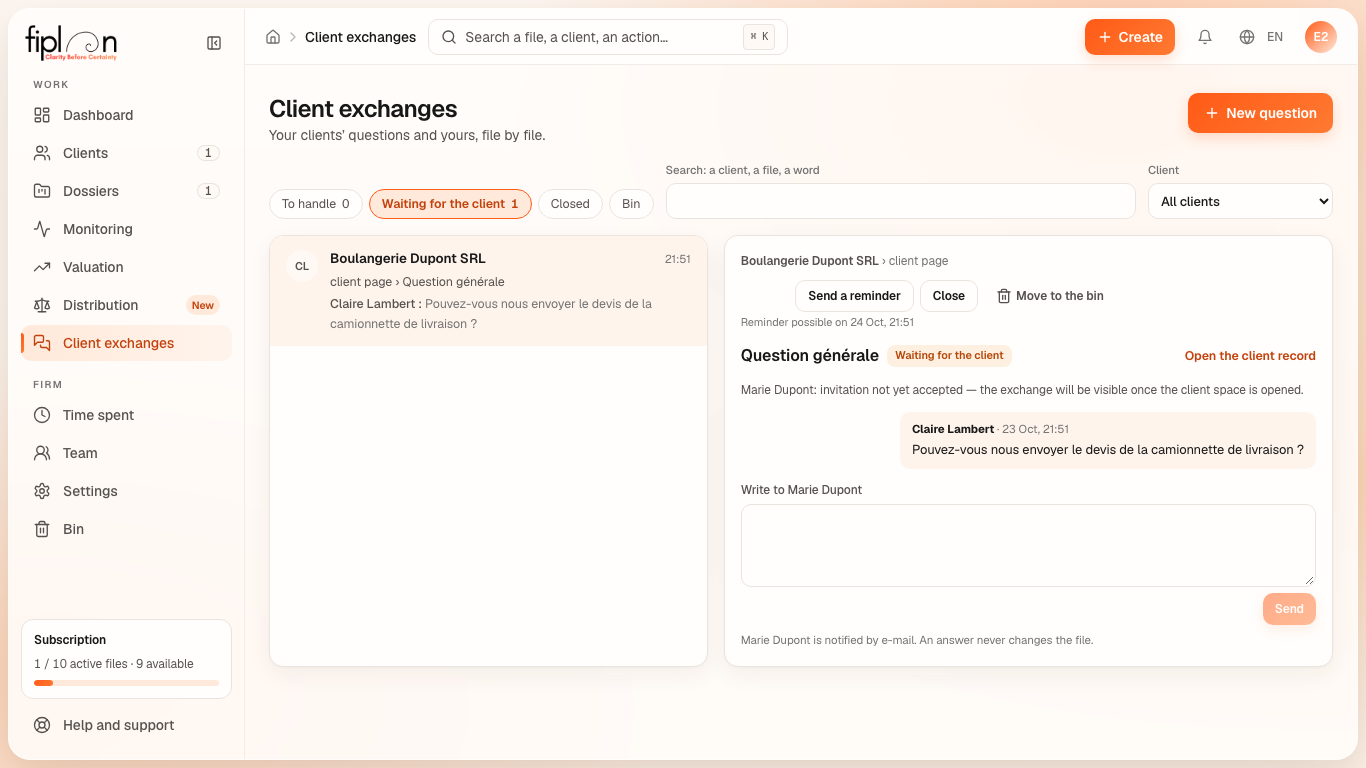
The Client exchanges page (left-hand menu; its badge counts the exchanges to handle) sorts the exchanges into four filters, each with its count:
| Filter | What it shows |
|---|---|
| To handle | the firm's turn: the client has asked a question, or answered |
| Waiting for the client | your last message awaits their answer |
| Closed | the exchange is finished |
| Bin | the exchanges moved to the bin, restorable for 30 days |
The search covers the client, the file, the subject and the text of the messages; the All clients selector narrows the list to one client. A chosen exchange opens on the right: company › file, who sees it (“Visible to … (active access) and to the firm’s team”), what the client was looking at when asking, the messages and their “Read by …” acknowledgement, the button that opens the subject's screen (the entries, the monitoring, the valuation, the file or the client record), and your answer.
On the client's side, the Exchanges page shows the same exchanges, grouped by file, with its filters All, To do, With your accountant and Closed.
Steps
- Open Client exchanges: the To handle filter shows first. Choose an exchange; opening it marks it read, and the client sees “Read by” and your name under their message.
- Write your answer. To attach a document of the file — a shared plan, a monitoring report, a valuation report —, Link a published document, then choose it. Send: the client is notified by e-mail.
- An answer to your question has arrived: Read and enter opens the line or module concerned. Enter yourself what the answer tells you: an answer never changes the plan.
- No answer? Send a reminder: at most one reminder per 24 hours.
- Settled: Close. An exchange no longer needed: Move to the bin; it also disappears for the client. For 30 days, it can be restored from the Bin filter (Restore); after that, it is permanently deleted, with its messages.
- A message sent by mistake, not yet read by the client: Withdraw. The thread shows “Message withdrawn by …”.
- On the client's side: the Ask a question window asks Which file?, then About what exactly? (optional) and Your question; Send the question. The client likewise withdraws their unread message, and closes their own question with It’s settled.
Worked example · Boulangerie Dupont SRL
On the line “Camionnette de livraison” (delivery van) of the Investments module, the accountant asks Marie Dupont whether the quote received excludes VAT; he expects An amount and an explanation.
| Step | At the firm | At Marie Dupont's |
|---|---|---|
| The question goes out | Waiting for the client filter | an e-mail naming the file “Plan financier 2027-2029” and the subject, never the text; in Exchanges, “Your turn to answer” |
| She opens the exchange | “Read by Marie Dupont” under the question | — |
| She answers | To handle filter, “Answer to read · Read and enter” | “With your accountant” |
| The accountant opens the thread | — | “Read by” and the accountant's name under her answer |
| Read and enter | the Investments module opens; the accountant corrects the line if needed | “Answered” |
| Close | Closed filter | “Closed” |
The amount in her answer stays in the exchange: it only enters the plan if the accountant enters it.
Pitfalls
What it changes · 2027
Source
Fiplan convention: src/pages/DemandesClients.tsx (the “Client exchanges” page); src/lib/acces-client/echanges-cabinet.ts (the four filters, the search); src/lib/acces-client/echanges.ts and src/components/espace-client/EchangesEspace.tsx (the states and the thread on the client's side).
Rules in the database: 20261004200000_acces_client2_demandes.sql (a question requires an invited or active access; at most one reminder per 24 hours); 20261009180000_echanges1_questions_deux_sens.sql (questions in both directions, read receipts); 20261009190000_echanges2_cabinet_corbeille_documents.sql (the bin: 30 days, then permanent deletion; withdrawing a message by its author, before it is read; the linked document, published on the exchange's file). E-mails: supabase/functions/_shared/email/modeles/espace-client.ts (the text of a message is never copied). Rights tested by npm run audit:roles (scripts/audit-roles.mjs, section D).