
Creating a client
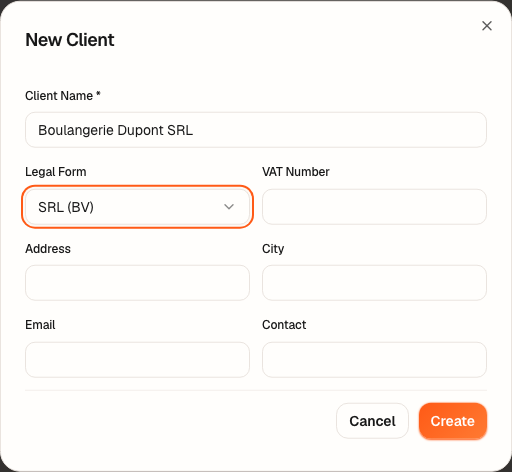
Before the first file, you need a client: the company for which you are drawing up the plan. Its record needs only a name and a legal form; the rest can be filled in when you have it.
What it is for
The client groups its files (plans, versions), its shareholders, its delivered documents and your notes. Its legal form is read by every file: it decides, for example, whether the company has capital — a public limited company (SA / NV) — or a contribution outside capital (apport hors capital / inbreng buiten kapitaal) — a private limited company (SRL / BV) or a cooperative company (SC / CV).
Steps
- Open Clients and click New Client.
- Enter the Client Name: it is the only required field.
- Choose the Legal Form: SRL (BV), SC (CV), SA (NV), Non-profit (ASBL) or Self-employed.
- If you have them, fill in the VAT Number, the Address, the City, the Email and the Contact (the phone number).
- Click Create: the record joins the list of clients.
You can also create the client while you create the file: in the Client field, type its name, then choose Create “…”; the company number (numéro d'entreprise / ondernemingsnummer) is optional there, and will be added after incorporation.
Worked example · Boulangerie Dupont SRL
| Field | What you enter | Why |
|---|---|---|
| Client Name | Boulangerie Dupont SRL | the name that will appear in the reports |
| Legal Form | SRL (BV) | a private limited company: a contribution, no capital |
| VAT Number | (empty) | the company is not yet incorporated |
| Address, City | the address of the future shop | optional |
No amount here: the client record carries none of the plan's figures.
Pitfalls
What it changes
Source
Companies and Associations Code (CSA / WVV): the SRL (book 5), the SC (book 6) and the SA (book 7). The SA has capital (art. 7:2); the SRL has none (art. 5:3).