
Entering revenue
Revenue is entered as a formula: “€18,000 excl. VAT per month, VAT 6%, from January 2027 to the end of the plan”. Fiplan rolls it out into monthly amounts, calculates the VAT for each month and derives each financial year's sales from it.
What it is for
Revenue (class 7) makes up the turnover in the income statement. It is also a reference for other lines: purchases entered as a percentage of turnover, a stock calculated on turnover.
Steps
- In the file, open Encoding, then Revenues, and click New (or the N key): the “New line — Revenus” window opens.
- Choose the PCMN Account, the account in the Belgian minimum chart of accounts (PCMN / MAR): type a word or the start of a number, for example
700. Then check the Title, prefilled with the account's name. - Choose the Calculation method: Fixed amount, Quantity × Unit price or, if another revenue line already exists, % of turnover.
- Enter the Amount excl. VAT of one occurrence — with Quantity × Unit price, the Quantity and the Unit price excl. VAT — and the Frequency: Monthly (the default), weekly, daily (5 or 6 days a week), quarterly, yearly or one-time.
- Choose the VAT rate (0%, 6%, 12% or 21%) and, if your customers pay later, the Payment delay (days).
- Check the Start period and the End period (by default, End of plan).
- Read the preview on the right — the total for each financial year. The Monthly detail tab, at the top of the window next to Entry (D key), opens the table of months and the growth per financial year; growth once applied is summed up in Entry, with the Edit link.
- Click Save: the window's footer confirms “✓ Saved · January 2027 · Yr 1” — the line's start month and its financial year —, then the window closes by itself after one second; Esc or a click close it at once. Save and new line (Shift + Enter) keeps the window open, empty, and recalls the saved line in it. If saving fails, the reason and what to do appear in a box above the footer, until you close it.
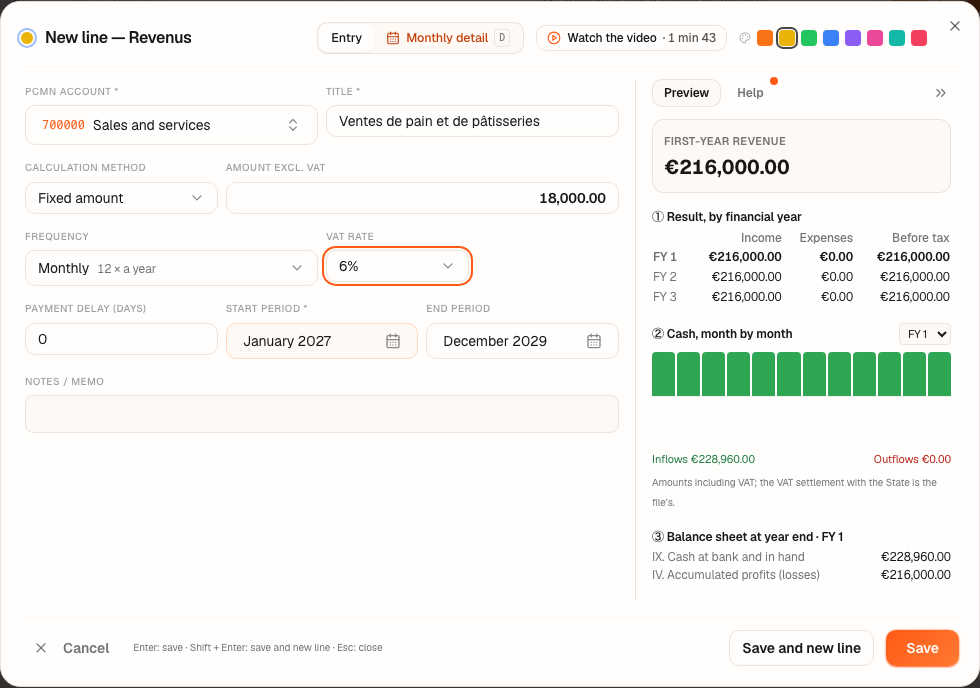
Worked example · Boulangerie Dupont SRL
Sales of bread and pastries: €18,000.00 excl. VAT per month, VAT 6%, received immediately (0-day delay), from January 2027 to the end of the plan.
| Excl. VAT | VAT | Incl. VAT | |
|---|---|---|---|
| Each month | 18,000.00 | 1,080.00 | 19,080.00 |
| Financial year 2027 | 216,000.00 | 12,960.00 | 228,960.00 |
The financial years 2028 and 2029 carry the same revenue: €216,000.00 and €216,000.00.
Pitfalls
What it changes · 2027
Source
Minimum standard chart of accounts (plan comptable minimum normalisé / minimumindeling van een algemeen rekeningenstelsel, annex 1 to the Royal Decree of 21 October 2018): class 7 (income), account 70 (turnover), account 451 (VAT payable), account 400 (customers).
VAT Code (Code de la TVA / Btw-wetboek): the rate depends on the goods or service sold; the user chooses it on the line.
Fiplan conventions, declared in the code: a formula rolled out month by month (deroulement-ligne.ts), VAT rounded to the cent each month, a payment delay converted into whole months (30 days per month, rounded up).