
Receivables and debts
A rent deposit, a loan granted to a third party, a debt spread over several months: these are amounts that arise, then are settled on a schedule. The account you choose tells Fiplan whether it is a receivable (to collect) or a debt (to pay).
What it is for
The Receivables & Debts module accepts receivable and debt accounts (class 4, the receivables and guarantees in 28-29, and a few accounts 17). The type of an asset account makes it a Receivable (to collect); any other account, a Payable (to pay). You do not choose the direction: it comes from the account.
Steps
- Open Encoding, then Receivables & Debts, and click New.
- Choose the PCMN Account (Belgian minimum chart of accounts, PCMN / MAR) and a Title; the badge shows the direction detected.
- Enter the Total amount and the Counterparty.
- Choose the Payment schedule: Single payment, Monthly, Quarterly or Yearly; then the Number of payments and the Payment start.
- If the receivable or debt bears interest, enter the Annual interest rate (%) (otherwise leave 0).
- Check the Start period — the month in which the receivable or debt arises —, read the schedule and click Save.
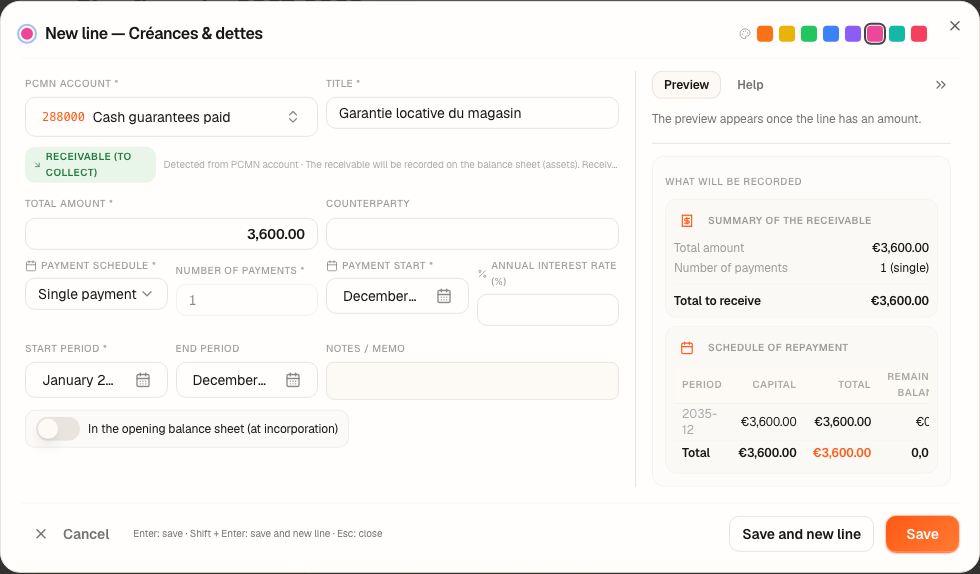
Worked example · Boulangerie Dupont SRL
The bakery pays the shop's landlord a rent deposit of €3,600.00 (garantie locative / huurwaarborg) in January 2027, returned in one go at the end of the lease, in December 2035. Account 288000 (cash guarantees paid, in “IV. Financial fixed assets” on the balance sheet): it is a receivable.
| What Fiplan posts | Period | Debit | Credit | Amount |
|---|---|---|---|---|
| The receivable arises: the money goes out | January 2027 | 288000 | 550000 | 3,600.00 |
| The refund | December 2035 | — | — | outside the plan |
The refund falls after the last financial year: on 31 December 2029, the receivable is still on the balance sheet at €3,600.00.
The principal of a schedule is repaid in equal parts, the last instalment taking the remainder; if there is a rate, the interest of each instalment is calculated on the outstanding balance.
Pitfalls
What it changes · 2027
Source
Minimum standard chart of accounts (plan comptable minimum normalisé / minimumindeling van een algemeen rekeningenstelsel): accounts 29 (receivables after more than one year), 40 and 41 (receivables within one year), 44 to 48 (debts payable within one year), 650 (debt charges).
Fiplan conventions, declared in the code (DebtFormSection.tsx, journal-engine.ts): the direction read from the account type; the creation in the start month of the line, for the total amount, as soon as a schedule is declared; the principal in equal parts, the last instalment settling the remainder.